Stepping Towards the Future

blue technology around brain

As I am about to cross the finish line of this semester, online learning has taken over the world. Things will never be the same as they were; technology has forever changed the way learners acquire new knowledge and master skills. While it was forced upon educators rather rapidly, I find myself thankful for this class as it helped me begin my journey in navigating the endless amazing sources available. I believe that as time goes on, more and more curriculum will be done on screens. Thanks to this class, I feel much more prepared for my future as modern day teacher in an ever changing world.

When we began the class, we started working fairly basic but valuable websites. In particular, I found Interactive Google Slides to be really fun. Like a modern day choose-your-own adventure book, interactive slides allowed my to create an activity for the preschoolers I was working with at them time about learning social cues and being a good friend. It would have to be done with an adult, but i believe it could start some good conversations.

As the semester progressed, we worked with another Google tool: Google sites. I decided to focus on kindergarten standards to create a website about weather. Google Sites is easy to navigate and has a lot of really great features such as embedding YouTube videos and other Google Tools. This is my favorite tool we learned about; I have a feeling I will be frequently using this!

Another valuable tool we got to learn to use is Edpuzzle. Edpuzzle allows teachers to crop, pause, and add questions or comments to any YouTube video. It also takes away advertisements and suggested videos at the end, so students won’t potentially click on something you don’t want them to. There is so much great YouTube content, especially for remote learning, so I know this tool will come in handy too!

Finally, I believe my best piece of work from this class is the final project I created: a Google site for personal narrative writing for the 4th grade. I wanted to challenge myself working with content for older grades, and found that it was much different than working with the younger grades due to the type of content you can provide for them as well as the complexity of instructions they can follow. I used Google docs, Edpuzzle, YouTube, and image inserts to create an abundance of resources for the writers.

Featured Image by Gerd Altmann from Pixabay

In An Ever-Changing World

fish eye view of a city

We live in a world that’s constantly changing. The world today is noticeably different from the world just five years ago. While many parts of the world and society have evolved, technology provides one of the more evident records of the changes we’ve seen. With more schools becoming one-to-one or having classroom sets of ChromeBooks and iPads, knowing how to effectively implement and utilize technology into lessons is a valuable skill. Current events affirm the value of technology in the world of education. I think technology also holds value when instruction is in-person. EdTech Methods gave me the opportunity to explore the many ways that technology might support and enhance content and instruction. Of the different tools we explored, two of my favorites were Google Sites and Screencasts.

Google Sites

One of my favorite tools to use was Google Sites. I think Google Sites is especially helpful in organizing a lot of content in a format that is easy to navigate. It can be very useful if the teacher cannot be there in person (absent, online school, snow day).

My colleague and I created this website for 4th graders to provide a resource that they could revisit throughout any writing process.
I used Google Sites again when I created my final project. It was very helpful in organizing all the content I wanted to use. On this website, I incorporated several other technological components as instructional aids including an EdPuzzle video, Google Docs, Google Slides, and a collection of images.

Screencasts

I also really liked using screencasts. I think screencasts and lecture capture tools can be very helpful! Like Google Sites, I think they can be especially useful if the teacher is not able to be present for a lesson.

I used the screencast feature on my computer to create a short video explaining to parents how to multiply via the box and lattice methods so they can help their student with math homework.

My biggest takeaway from creating educational material with these different technologies is that there are so many ways to share content. Just as I have my favorites, my students will likely have a variety of applications or programs that they would prefer to use to share their work and learn material. Technology provides so many possibilities and ways to enhance lessons and engage students. As the world continues to change, I know there will be more applications and programs for me to learn and experiment with. I strive to be an educator that will implement technology to enhance learning experiences and engage students. At the same time, I think it can be valuable to take a step away from the digital world and be in the moment engaging in face to face conversations with students and encouraging students to engage with one another in person. My goal as an educator in an ever-changing and technology- driven world is to find the balance between interacting with technology and the people right next to us.

Featured Image by sergio souza on Unsplash

Final Portfolio: Making Technology Accessible

At the beginning of this journey, I started with what I thought was a decent understanding of technology, but I knew that I had a lot to learn. Now that I have created content on various platforms and applications, I realize that I am fully capable of implementing technology into my classroom in this digital era filled with distance learning. I strive to continue to be a lifelong learner, and the gift of technology is no exception. As an educator, I will not only embed technology into the classroom, but I will make it easily accessible to my students and their guardians. I will do this using multiple platforms, however, all of these will be embedded into my Google Site. This allows everything to be in one place that everyone, including those who are not in my class, can access. Below are some examples of lessons that I plan on implementing, or have already implemented, into my teaching, including my current website.

My Class Website created with Google Sites. Students and their guardians can easily access this with a link. They can interact with the documents and contact me if they need assistance!
Implementing technology into already existing units. This is also embedded into my website.
Take an artist tour! Watch your students create their own tours based on their research of a world renowned artist.

My EdTech Portfolio

Student with technology

It is the responsibility of any teacher to do all that they can to effectively convey and communicate content, to encourage students to engage with the material and reach their fullest potential, and to help students grow not only academically but socially and emotionally. In order to do this, I believe that teachers should work to integrate technology and all of the resources that it provides into their classrooms. I had a professor who told me that technology is something that students are already engaging with, so for school’s to resist the advances of this rapidly growing field would be limiting their methods of communicating with students (or something along those lines). While I agree with this statement, I believe that technology has the ability to not only provide an access point, but to enhance the classroom community in diverse and important ways. I have embedded some highlights from my portfolio that I feel illustrate 3 key ways that technology can help to create a classroom that is culturally responsive, encourages collaboration and connection, and allows students opportunities for experiential learning without even leaving the classroom.

Using Google Sites, I created a “Classroom Culture” Project where students have the opportunity to not only dive deeper into their own culture and what makes them unique, but learn more about their classmates’ cultures as well. In this case, technology allowed me to create a resource that makes my classroom and my teaching more culturally responsive, and will help my students to feel known and valued for who they are. To read more about this project, click below:

One of the things that this course allowed me to experience first hand was the collaboration and connection that can come from using technology. Using Google Slides, my colleague Anna Wanner and I were able to make an activity on making inferences using clues from the text. Creating technological masterpieces, as well as using technology (i.e. the finished google sites project above) can be a collaborative experience for both teachers and students. Sharing documents and work, as well as their stories and their personal experiences on a digital platform can allow students to connect with one another from physically different locations. To read more about the inference project, click below:

Using Google Tour Creator, I was able to create a science lesson all about investigating the ways in which specific environments have been impacted by environmental change and human actions. Technology like this resource from Google, and virtual reality (if you can access it) have the ability to transport students to new places. Not only does this make them global thinkers, but it gives them the chance to explore and experience a location that they may not have the chance to physically visit on their own. To read more about this project, click below:

I am looking forward to finding more technology resources and continuing to expand my knowledge on the tools that are out there to make my classroom the best it can be! Enjoy my portfolio!

Featured Image by Mudassar Iqbal from Pixabay

Final Project – Student Led Conferences

For my final project, I have created a lesson for second grade students. In this lesson, students will construct an Adobe Spark Video to share with their parent or guardians for student led conferences.

The instructional goal for this lesson is for students to create an Adobe Spark video including personal work. Students will include reading, writing, and math samples along with their responses to two questions. Prompts include: Why did you choose this piece of work? & What did you learn while doing this work? Students may answer the questions within their Adobe Spark Video or have written responses prepared to share.

I chose to use Adobe Spark Video as the platform for this project because students can present their work in an organized and quick way. As seen from the example below Adobe Spark Video allows you to add photos, text, customize the music and more. Adobe Spark Video also offers many templates for students to start from and is easy to navigate for first time users and students.

I hope these videos are viewed by parents and seen as a celebration and reflection of their students’ work. This assignment is a culturally relevant teaching practice and enables relationship building among students, parents, and teachers.

Featured Image by: Adonyig Edits by: Braelyn Higdon

My EdTech Portfolio

I believe that technology can be a great resource in the classroom. For example, technology can be used to create and build relationships and connections with students. One of the project’s I created was a get to know you timeline activity, where students could create a timeline of important events in their lives, such as starting new grades or moving. Here is my example of this project.

Another example of a relationship and community building activity is one I created for having a circle activity. This activity allows students to build relationships with their peers in a safe environment. I created a google forms that would allow students to understand this circle activity better.

I also believe that technology can be used by students to explore the material in school with real world applications. In one of my lessons, students would create an online cookbook complete with recipes and the fractions in the recipes. This digital book could be printed out into a physical copy that they could use in their homes.

Another real world application is exploring digital photos to find shapes in the real world. This allows students to get excited about the world and buildings around them. Here is my post about this lesson.

Overall, I believe that technology is a great resource for students in the classroom. I’m excited to use my technology skills in my future classrooms and to find even more exciting resources for my students!

Final Project – 1st Grade Skeletal System Mini-Unit

For my final project, I decided to use Google Sites to create a website that will allow me to communicate with students and parents or guardians as we are distance learning. On the website, I will post a weekly science lesson. This week’s lesson is on the skeletal system where students will become bone experts and will be able to answer the question: “why do humans need bones?”

My target audience is for my students who are in first grade and I wanted to make sure that the website is easy to use and easily accessible.

I used EdPuzzle for an interactive read aloud using a book called “Inside Your Outside” by Dr. Seuss. EdPuzzle is easy to use and makes videos more engaging.

Using Padlet, I had my 1st graders share a fact about bones after they went online and did some research. Padlet provides students with the opportunity to tell the whole class what they have discovered while researching and what they have learned. Padlet can be used in a classroom to encourage students to share their ideas and have a voice. It gives students who are quiet or shy, the opportunity to feel comfortable sharing their opinions and contributing to the class. Padlet allows for all students to be able to see what their classmates are thinking but also provides independent work time. I like Padlet and think it is a great tool for students and teachers and could be used for such a wide variety of activities in the classroom.

Final Project – Who are you??

For my final project I decided to use Book Creator to create an introduction activity for the beginning of the year. I wanted this to be a type of get to know you activity for students to share whatever information about themselves they wanted with me. My example was designed for lower level elementary, most likely grades 2-3 but for my specific class I would have done it in second grade. I would do this activity in class, showing my book as an example and then walking the students through how I made my book and how the website works.

More specifically wanted to use this platform because I think that it gives students a way to really personalize their books with pictures, colors, different text and other graphics. I really liked how easy it is to import pictures from your own computer, and to choose different options to really personalize their books. I decided not to create any required things they have to put in there, but rather let them choose what they felt was most necessary to share and what they wanted me to know the most. I would give the students a list of different ideas as well as a limit of 8 pages. I really like how easy it is to use this website and the many options it has.

Being a Tech-Friendly Teacher

Welcome to my digital profile! This is a collection of all my work that I have done throughout my class called EdTech methods. The course was to teach the importance of integrating technology into the classroom through different platforms. Each week we learned about a new website and created sample lesson plans using such websites.

As you scroll through my webpage, you will see that the newest posts are on the top and the older ones are at the bottom. From that, you will be able to see the progress that I have made while navigating this new form of instructional learning.

Here are some of my highlighted posts:

Google is one of the more well-known platforms for teaching. It has a variety of different tools like google slides, google docs, google sites and even google forms. I used google form to create a short pre-assessment about fractions.
One of my favorite websites to use was Adobe Spark. There were so many different formats that I could use to create lessons and teach students to use.
Using Book Creator, I was able to make a sample book for my students. It was a great tool to play around with. I have so many new ideas that I could use to implement this website into future lesson plans with my students.

As a future educator, I have always valued the concept that teachers are forever learners. This concept rings even more true for learning about technology within the classroom ! I thought I knew all about teaching students about watching videos and creating google documents. Boy was I wrong. The amount of online resources for teaching is endless. As the world of education continues to change, I plan on using these resources to help all my students reach their full potential.

Photo by Ian Schneider on Unsplash

Class 15: My EdTech Portfolio

My ed tech portfolio

When someone clicks on your author link, they will see all of your posts in reverse chronological order. This is a great portfolio to show prospective employers. (And you can bet that in these times, ed tech skills will be highly valued.) Here’s your chance to add one last post that will introduce your work to your viewer.


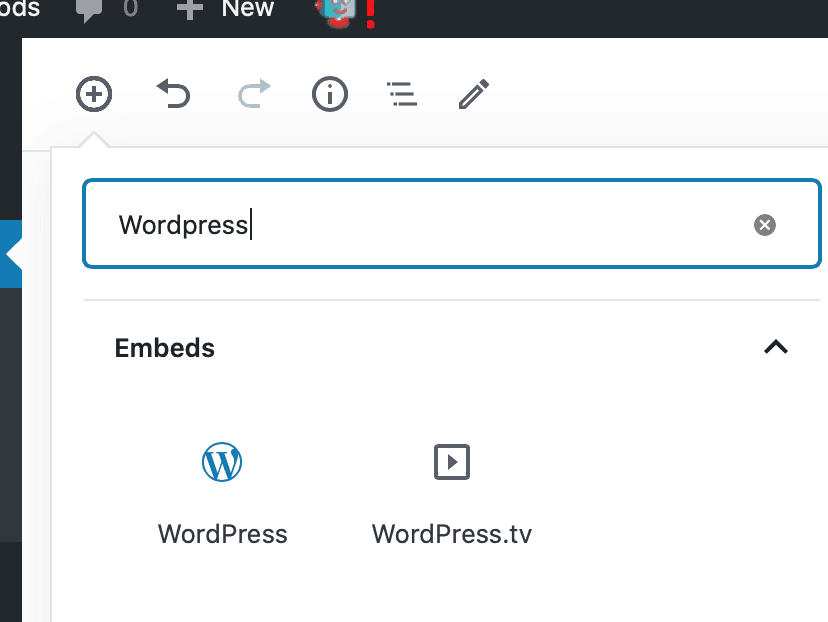
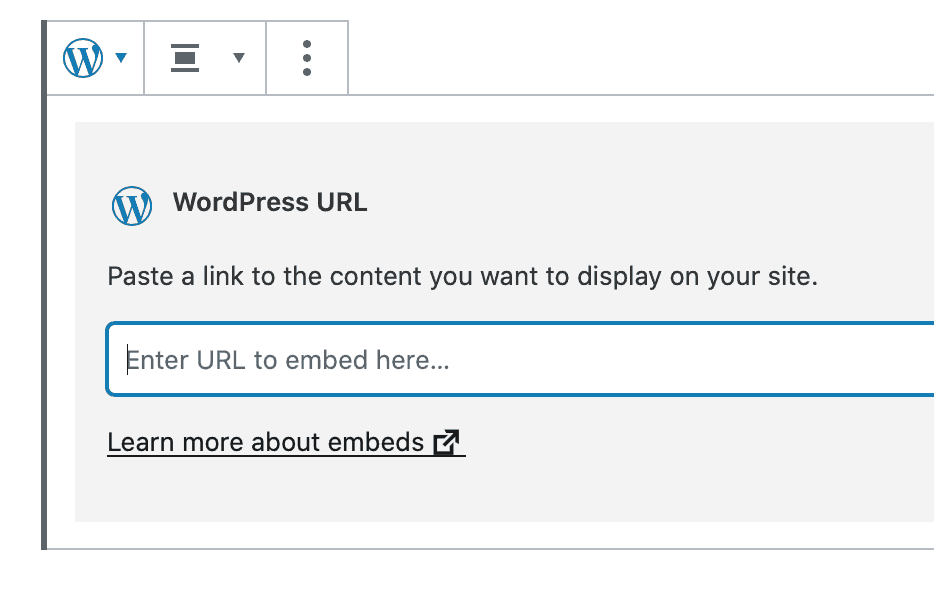
You can “illustrate” this post with a few of your favorite posts using a WordPress embed. To embed one of your previous posts, just add a WordPress block and add the URL of the post you want to add.

Your embed will look something like this. It will have your featured image plus the beginning of your post. It will also be an active hyperlink to the post.

Sample WordPress embed

ASSIGNMENT: Create a Final post to introduce your work | Portfolio Showcase 20-A14

Be sure to give it a good title and featured image. You might want to think “big picture” here. This will introduce your work to the world.

Possible prompts:

  • Highlight / showcase a few of your posts that you are proud of. Maybe offer short explainer for each.
  • Showcase your progress – ” I started here – and now can do more complex work.”
  • Your approach to teaching / learning / tech
  • What you learned about how tech can support instruction.

END OF SEMESTER CHECKLIST
  1. Complete course assessment at SmartEvals
  2. All blog posts completed – see list here. 
    (You should have completed 14 posts – includes your final project and this final intro post )
  3.  Note: UP is asking instructors to take care of uploading your work to TaskStream. I’ll be doing that

Final Project- 4th Grade Personal Narratives

cartoon monitor with a document open

For my final project, I wanted to do something for an older set of kids than what I usually do just to see how it feels (it was fun). I remember writing my own personal narrative in 4th grade and really enjoying it, so I decided to create a Google Site all about that. The site has four pages for each step of the process: Brainstorming, Rough Draft, Editing, and Final Draft. I inserted various google docs, youtube videos, images, and used Edpuzzle to edit a video as support and guidance for what to do in each of these steps. I ended up finding some great resources for worksheets that help students plan out what they want to say. Ideally, students would spend one day brainstorming, two or three days writing, two days editing, and one day on the final draft. By then final day, students will have written a complete personal narrative that not only is well sequenced and edited, but that they are proud of too! Here are the standards I am basing the lesson off of:

CCSS.ELA-LITERACY.W.4.3
Write narratives to develop real or imagined experiences or events using effective technique, descriptive details, and clear event sequences.

CCSS.ELA-LITERACY.W.4.4
Produce clear and coherent writing in which the development and organization are appropriate to task, purpose, and audience. (Grade-specific expectations for writing types are defined in standards 1-3 above.)

CCSS.ELA-LITERACY.W.4.5
With guidance and support from peers and adults, develop and strengthen writing as needed by planning, revising, and editing. (Editing for conventions should demonstrate command of Language standards 1-3 up to and including grade 4 here.)

CCSS.ELA-LITERACY.W.4.6
With some guidance and support from adults, use technology, including the Internet, to produce and publish writing as well as to interact and collaborate with others; demonstrate sufficient command of keyboarding skills to type a minimum of one page in a single sitting.

CCSS.ELA-LITERACY.W.4.10
Write routinely over extended time frames (time for research, reflection, and revision) and shorter time frames (a single sitting or a day or two) for a range of discipline-specific tasks, purposes, and audiences.

Featured Image by 200 Degrees from Pixabay

Final project—A Supplemental Activity

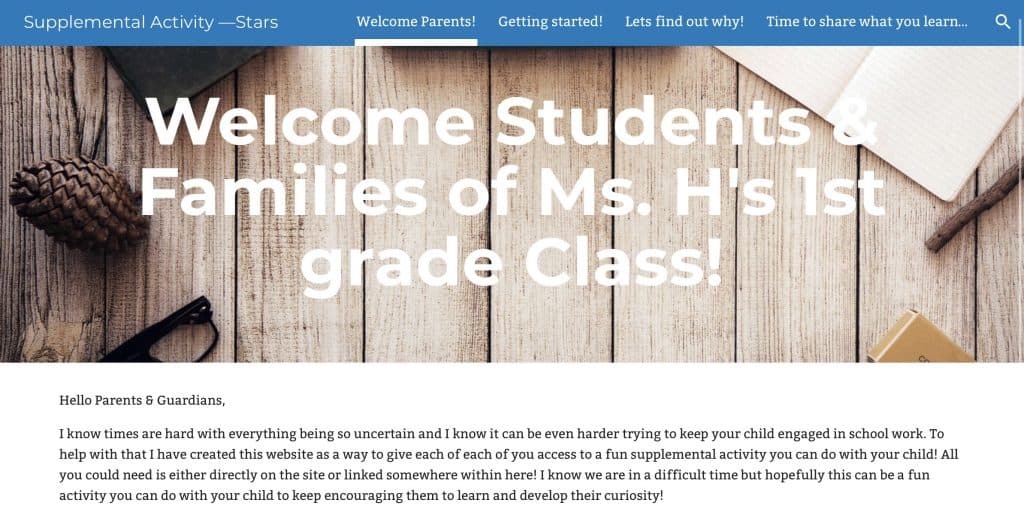
For my final project I decided to create an online supplement Science activity for 1st graders. The point of this activity is to provide families with the tools and instruction they would need in order to do this lesson with their student(s). The learning target of this lesson is: TWL be able to answer the question, why can you only see stars at night? By watching and discussing key ideas they notice throughout a video. I have used edpuzzle to embed an instructional video with questions and notes that the learner needs to focus on in order to get the answer to their activity question.

With distance learning being the new thing, and many parents not having any idea what to do or how to teach their child, I have created my final project to serve as a simplified lesson plan, that parents of any student should be able to follow. By using google sites as my main technology, I was able to either link, embed or include everything a parent would need to complete this lesson with their student, making the daunting task of teaching their student a little less scary by having everything in one place, neat and organized.

featured image: Pixabay