Check out a little bit about myself in this cool app
This App by Microsoft called “Sway” is super cool!!!
Super easy to use and has really cool features .
I can see having my Biology students do fun projects with this application

The art and craft of teaching with technology

Check out a little bit about myself in this cool app
This App by Microsoft called “Sway” is super cool!!!
Super easy to use and has really cool features .
I can see having my Biology students do fun projects with this application

Eugene, Oregon may not seem very exciting, but I loved growing up here! I thought this was a cool new presentation tool that is quick and easy to use. I think it’s great as another option over powerpoint. It could be a great way to introduce students, like we are doing, or for a final project on a topic. As a teaching tool, I could see teachers presenting lessons this way and making lessons a little more interesting.

I made a sway about my home, Kāneʻohe. I really enjoy using sway, but it definitely takes time to get used to. I am still learning how to manoeuvre the website, but I have gotten better at using it. I hope you enjoy learning a little more about where I am from!

Growing up in the Bay Area was a wonderful privilege I will always be grateful for. I was exposed to many different cultures and customs, and had great opportunities to immerse myself in educational programs and experiences. Putting together this presentation on Sway was surprisingly easy and straightforward. The program is definitely user friendly and allows creative freedom. I can definitely see myself using this resource for presentation in my classroom in the future.
Cover Image: Moonrise San Fransisco Bay
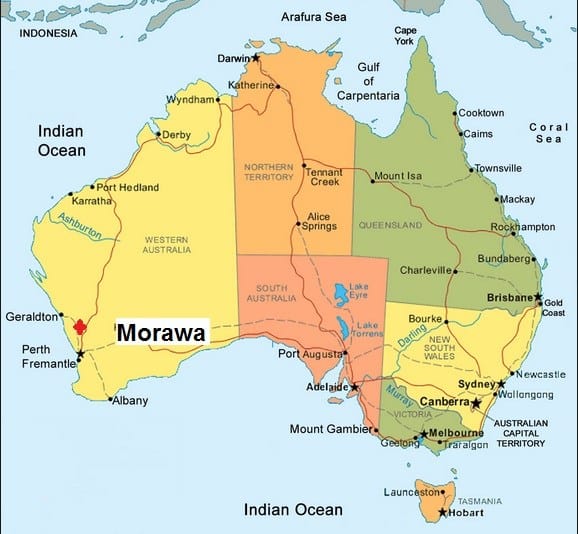
This is a blog post about where I am from. I included general things about Australia and specific things about where I live/about me. Sway was pretty easy to use to create this story. It was easy to add images and text and create a story this way. I like how you can change the style of the story by either changing the colour scheme or layout. This gives a great range of creativity to the site and would give students the chance to create something unique.
Students could use Sway to create their own story about themselves or they could create a project about a particular topic. I think students would be able to use this technology with ease and could also work in groups to collaborate on something.
If I was to use Sway for another project, I would play around with it more and try out the different layouts that you can use!

I grew up in Spokane, WA and the surrounding areas. I think the Sway would be a good way for students to express their knowledge in a different way. It’s a little difficult to use but could be functional. It can be edited by multiple people, but I don’t know how easy it would be to use with a group. I didn’t like how the captions can’t be shown all the time, but by using text it can function as a caption. I don’t know how I would use this in the classroom specifically, but a project could be made around it.

I think that Sway would be useful in the classroom for presentations. It would be helpful for students who need guidance or an outline when creating a presentation. I do like that you are able to collaborate with others on a presentation. I liked using Sway, but I felt limited in some of the customization. It was nice to have different templates and styles to choose from, but I felt that I wasn’t really able to make adjustments or customize within a given style. I can see giving this tool as an option for students to use, but I’m not sure I would recommend it.

I found Sway very easy to use and navigate. This could be great tool for teaching lessons to students, or sharing more about yourself. In this Sway document I shared a bit about where I grew up, my hobbies, and my family.
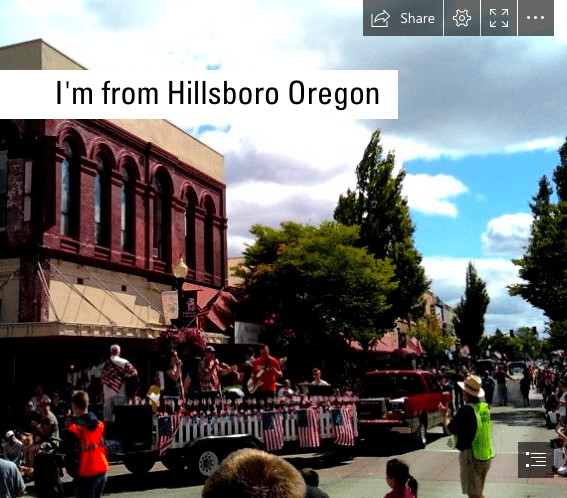
Sway is a Microsoft tool to create presentations, blogs, newsletters, and many other project ideas. Sway could also be used by teachers to outline their unit plans and organise all of their assessment materials etc. to share with other teachers.
This embedded sway presentation I created is about where I grew up. This would be great to use to share about myself with my students in the future. Sharing about your home is apart of sharing your culture. Having all students share about their home through a platform like sway would be a culturally relevant teaching/learning activity. Additionally, as students learn about others in their class they slowly move from pre operational to concrete operational where students are able to understand they are not the centre of the world.

Have you ever wanted to visit Maui, but never had the chance? Never fear, this Sway will do the trick…
This is a more simple version of a trip to Maui, one in which I mainly talk about my hometown of Wailuku. Growing up in a small community has helped me made meaningful connections with the people and the environment around me. Living in such a beautiful, unique place has really opened my eyes to how lucky I am.
My Maui Sway will give you a super brief history about Wailuku, some favorite traditional and local Hawaiian foods (duh, because that’s the best part), and also some fun photos of family, friends, and fabulous destinations found throughout the island.

I used Adobe Spark Post to create a video about science riddles. I think that this is an easy program for kids to use to create a variety of assignments. They can make presentations and movies using free content from the internet or videos/ pictures that they upload themselves. I think that students would enjoy using this as it allows them to be as creative as they want or gives them structure if they need to.

It only takes a minute to learn how to use adobe spark video as they provide an instructional video when you sign up and each time you log on if you need. This can be a great resource for teachers to create slide shows, presentations, as well as an activity and technological resource that students can take advantage of for creative projects and literacy lessons. You can record your voice that plays during designated slides so it is easy to tell a story with adobe spark. Students could create their own read aloud or write their own story and type out parts of it on the slides with corresponding images they have found or created and then voice over the entire story for their audience.
I created “Snow Day” as a simple example of what is possible in a short amount of time with the website and demonstrated the use of the sites pre created themes and templates as well as background music for the story.