Google Draw: An Electronic Twist!

Featured image: “electronic circuit board” by Creativity103 is licensed under CC BY 2.0

As seen previously, the periodic table is quite the amazing tool. One of its uses is in relation to creating electronic configurations.

This activity was designed for high school chemistry students who have already been introduced to electronic configurations, visualizations of atoms, and have an understanding of the periodic table. A background in quantum numbers (and their meaning) is strongly recommended. This activity can be done either individually or as a group. Students can also edit this online or respond on a different sheet of paper.

Students are instructed to write electron configurations and identify valence electrons for given species, some of which are ions or transition elements. Students are then asked:

  • What species, if any, have completely filled valence shells? How do you know?
  • How do electron configurations relate to their periodic group number?
  • What do you notice about transition elements?

Finally, students are asked to relate electron configurations to previously learned material using a graphic organizer.

The goals of this activity are to:

  • Practice writing electron configurations
  • Relate electronic configurations to layout of the periodic table
  • Place electronic configurations in a broader view of chemistry
  • Practice critical thinking skills

The benefit of using Google Draw is a variety of activities can be done in one space. So students can immediately see how electron configurations relate to other material. Students can also use a variety of shapes and lines to edit the graphic organizer, creating a a visual representation of critical thinking. This feature can also be useful as an aid for explaining student reasoning. A variety of fonts are available for student responses, allowing for greater customization as well.

Click HERE to view the Google Draw as well.
Fill in the Fractions – Google Drawing

Grade: Third Grade

Goal:

The goal of this lesson is, students will be able identify parts of a group as a fraction and students will be able to represent a fraction by coloring portions of a shape. This Google Drawing helps us meet this goal by presenting students with shapes and parts of a group that they will then manipulate to fit desired fractions.

Standards:

3.NF.A.1 Understand a fraction 1/b as the quantity formed by 1 part when a whole is partitioned into b equal parts; understand a fraction a/b as the quantity formed by parts of size 1/b.

This guides students toward meeting this standard as they get the practice and visual representation of the fractions as a quantity and as of parts of a whole.

Student Instruction:

1.) Click the link for the Google Drawing.

2.) Make a copy and then share with your teacher.

3.) Fill in the appropriate amount of parts of each shape to fit the fraction to its right.

To fill in a shape click the desired part, then click the paint can that is spilling out. The paint can is pictured to the right. After you click that, choose a color of your liking.

4.) Check over your work, and then double check to see if your work is shared with your teacher.

Teacher Notes:

  • Some students may really struggle with the interface and with being able to share work with you. Be prepared for some work to be lost.
  • Things are easily manipulated and moved, certain parts may be lost. You can use this to your advantage with the shapes. Students may choose to delete parts to fit the fraction!

Google Drawing:

https://docs.google.com/drawings/d/1K2MXUu6edC0jbWfWT5gTiwCddv15BCwCnomhUS5XIL0/copy

Featured Image: Photo by MagicPattern on Unsplash

Spectacular Symmetry

Spectacular Symmetry

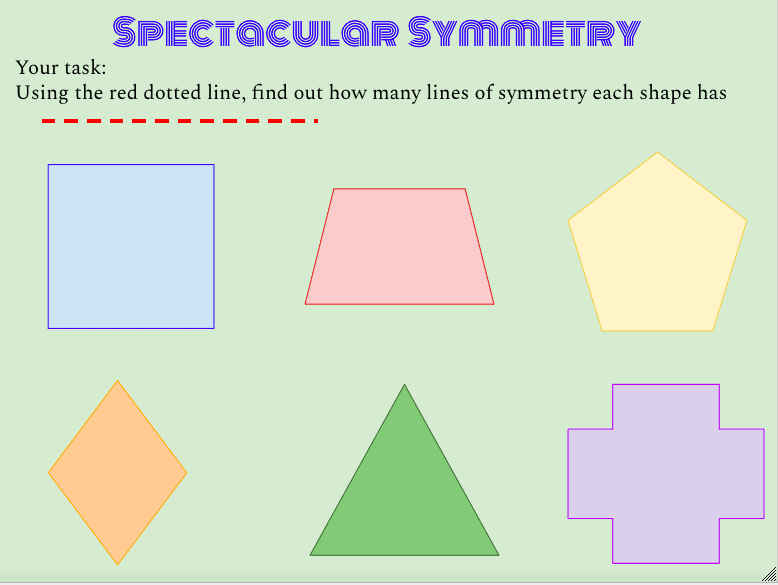
Hello again 8th grade mathematicians! Today we are going to do an activity to practices finding how many lines of symmetry a shape has. You are going to use this Google Draw activity to identify how many lines of symmetry each shape has. After you have done this there are a few questions I want you to answer in your notebook:

  • How many lines of symmetry does each shape have?
  • How many sides does the shape have?
  • Is there a pattern between the amount of sides and the number of lines of symmetry?
  • If I told you a shape had 20 sides (each side has the same length), would you be able to tell me how many lines of symmetry it has?

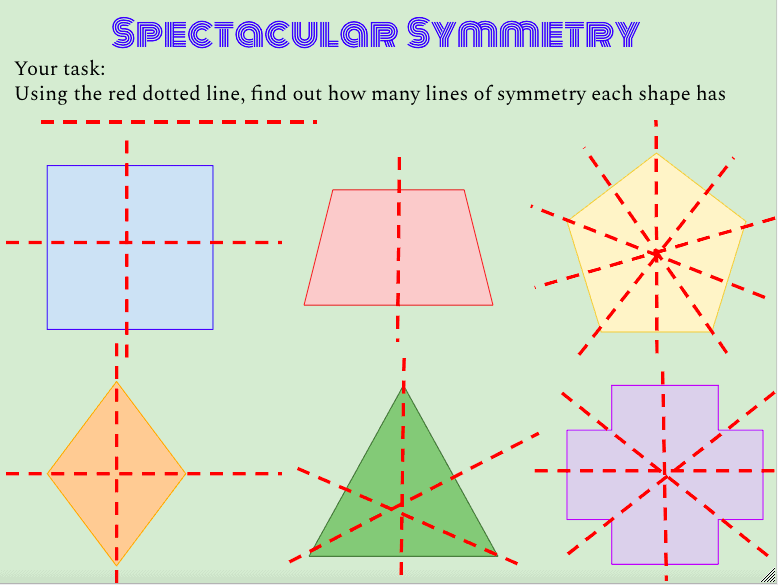
Check your answers below by sliding the bar to reveal the lines of symmetry for each shape!

Slide the bar to reveal the answers

Make a copy of this Google Draw by clicking the image of the title “Spectacular Symmetry” below!

Goal of this lesson:

To allow student to discover the relationship between lines of symmetry, types of shapes and number of sides. This Google Drawing gives the students the freedom to use lines to find all of the lines of symmetry as well as to find patterns using 6 different shapes. This lesson can be used for students at many different levels: from introducing shapes and lines of symmetry to trigonometry.

Other ways you could use a this Google Draw Activity

  • An exit ticket to check for level of understanding
  • Partner activity: each student completes all 6 shapes and then compares answers
  • Introduction to symmetry: ask students to place lines where they could divide the shape (without explicitly saying lines of symmetry)
  • Homework assignment