My Ed in Tech Journey

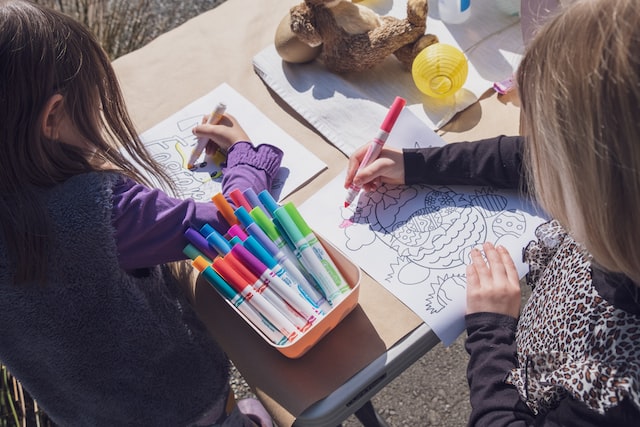
Image from Gino Crescoli on Pixabay

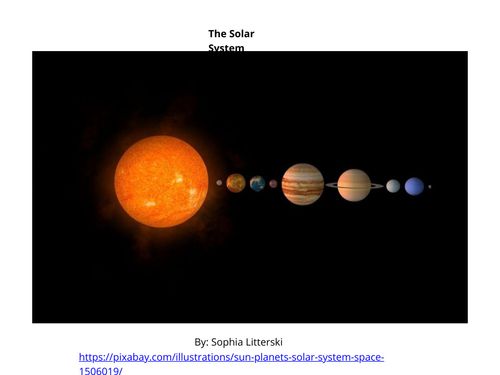
Perhaps my favorite resource to work with this semester was Book Creator. I used Book Creator to create a book for a K-2 class on the Solar System. I loved how creative you can get with this resource in addition to the themes and backgrounds provided to give someone more structure. The features are more simplistic and rigid. I found it difficult to find out to increase and decrease the size of the font. However, it was free to use and is very good for starting to create your own books for your classroom! Teachers can create their own libraries and is amazing for student content-based projects instead of tests.

After being paired with a partner, we created a Google Sites website focusing on simple and engaging K-2 science activities about the weather. Some of the activities used are on heat and storms. The goal for the website is to provide activities for lessons and/or units on the weather. Science is fun and allowing students to participate in a hands-on activity makes the learning experience enriching for everyone. Google Sites was tricky to work with at first, but eventually became easy to use. My favorite part was the many options available with how you can structure the website.

I used Google Forms to create 2 different quizzes. The first was a fraction quiz for 4th-5th grade students working on adding and subtracting fractions. The second was a “Buzzfeed” style self-guided quiz that allows people to choose between options. This quiz in particular was about the amazing wonders of the state of Oregon that fits best with what one picks along the way. This form was far more difficult to make since I had to pay close attention to the additions and where they were placed. I loved the variety Google Forms had. You can require certain questions, allow it to be anonymous, and make it as simple or detailed as you would like. Google Forms can be used in any context, not just education.

After looking at all my posts, I’m most proud of how I’ve become more familiar with these websites, especially Google Forms. I started off the semester struggling with how to work with Sway and ended up creating some amazing books, websites, and Google Forms. I will absolutely be using Google Forms and other common technology resources like Google Sildes and Jamboard with my future students. Who knows what AI will be next year, let alone in the next 5 years. Will plagiarism rates drastically increase? Will teachers know how to detect AI that a student may have used? Who knows! What we do know is that technology is ever changing and there are many resources teachers can use to make their days easier.

Future Sophia

It really seems like these past 10 years have flown by! Around this time you were drowning in work counting down the days until you graduated. You had never felt so relieved before when you walked across that stage. Of course you miss the people you met, but you had a blast in grad school! It was only 7 quarters, but you met some of the most amazing compassionate people in your program and while volunteering in the community doing what you love. We did complete the Child Life Internship and got your certification. You’re now at your dream job at Seattle Children’s Hospital working with children of all ages. This time 10 years ago you were really upset you had to leave your Kindergarteners. They were such a joy, they even set up their own workforce! Who knows, maybe you will go back to Portland and work for them in the future.

In the meantime, you’ve traveled outside of the country for the first time. Germany, Austria, The Netherlands, and Greece! Vietnam, Indonesia, New Zealand, and the Caribbean are on your bucket list. You are now married to your best friend and life could not get any better. Mom and Dad are enjoying retirement going on trips in their RV and you’ve become closer with your cousins. Despite losing several loved ones, you’ve stayed strong. C is for Cookie still keeps you going. Remember how much you listened to it in your last semester of college? You have so much love and support from your family. Life may seem hard now, but you have so much to look forward to, keep your head up!

Book Creator PD Presentation

An Introduction to Book Creator

Sophia and I have put together a presentation on Google Slides about different uses of Book Creator. This presentation is intended to be presented as a professional development for educators.

https://docs.google.com/presentation/d/1ZsXpEviOzOpuqL003llPpBisZbsVXwjXDaNilbO-TF4/edit?usp=sharing


The main goal of the presentation is to give educators an overview of what Book Creator is, how to use it at a basic level, extend basic understanding of the interface to include advanced features, introduce the Book Creator resource library, and give example uses of the interface.

In order to provide a solid understanding of the basic features of Book Creators, we will provide a walk-through tutorial of the interface and present an example book about the solar system.

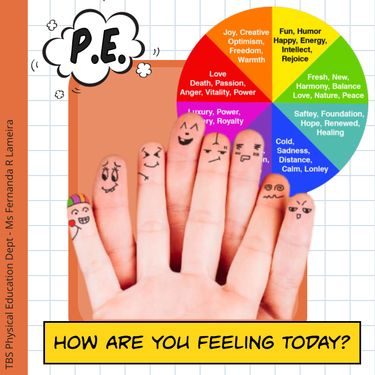
Additionally, we will be exploring the advanced features of Book Creator by exploring an example book that uses Youtube video emeds called How Are You Feeling Today? by Fernanda R. Lameira.

Next, we will introduce and explore the Book Creator resource library to begin thinking about example uses of the interface.

After exploring the different basic and advanced features of Book Creator and exploring the resource library, we will give participants some time to brainstorm different example uses of the interface in their own classrooms across grade levels. Participants will insert their ideas into a collaborative Jamboard.

https://jamboard.google.com/d/1M_Vh8WsHbA1IuBDJofufYT19CBAhYLy_ySoJXgZfpxA/edit?usp=sharing

This link can be kept as a resource for participants to refer back to for inspiration.

Cover photo by Mikołaj on Unsplash.

What’s the Weather Like?

By Sophia Litterski and Lydia Wanner

Greetings teachers! This Google Site exhibits a showcase of short activities that can be used to teach weather topics to K-2nd students through scientific inquiries. These activities can be used as stand-alone mini-lessons or activities that you build on throughout your weather unit. 

Each activity is complete with:
– the goal for the exploration
– materials needed
– directions for the exploration
– guiding questions for closing discussions

https://sites.google.com/view/weather-mini-lessons/home

Feature Image by Author

Fraction Quiz and Oregon Adventure

Link for the Fraction Quiz: https://forms.gle/z8yHs1R1E24YqzLN7

This quiz is for 5th grade. I increased the difficulty of the questions as it went on. I did not add a description of each answer. I thought that this was fairly easy to make and grade. I would aim this to be in class and students will have a piece of paper to write out their answers and come to me for help. I would not rely on a Google Form quiz to determine if they knew the material or not. Overall, it does take time to adjust the settings to your liking, but it is convenient to use.

Link for the Oregon adventure form: https://forms.gle/HUoUsCR4sLDF1PNH6

This pathway Google Form was far more difficult and took more time. I hope to incorporate this into a 2nd/3rd grade Oregon state unit. My Kindergarten students have learned about the many wonders of Oregon but are a bit too young to understand the purpose of this form. I had a difficult time with creating the sections to correspond with the answers. I was able to get it after some time. However, I hope to integrate this form into a more in-depth writing/research activity. Students will complete this form and then do research about the Oregon adventure they ended up with. A drawing or printed out pictures are allowed, even a map will be great! Overall, I want them to be able to know more about the state of Oregon and its environment and natural wonders!

The Solar System

I created this book for K-2. I am aiming for this book to be read to a 2nd grade class. Students will then be assigned a planet to research and write about. The link that I used for the information was a kid’s version of the Solar System created by NASA. We would first read the book in class and then kids would write questions they would like to know about each planet. Each student must write about 4-6 sentences about what they found that answers their initial questions. A drawing of the planet must be included. I would like to take it a step further and help them create a physical model of their planet in class. Each student would then be able to talk to the class about what they wanted to know, what they discovered, and talk about their drawing and/or their physical model. A link is below to view the book.

Direct link to book https://read.bookcreator.com/tBhmUPQ1EpbWOe8j0tOprPG8OFy1/y9qzWH4vQLyXBf34jzc2ow

Where I’m From

I used Sway for this assignment. I really liked the layout and how you could get a lot of different images, even with specific searches. There wasn’t any way I could let an image be in the background with the text in front of it. This only happened with the title slide. There was also no way the text and image could be next to each other and was only allowed to be separate. I think that Adobe Express would have been better. Overall, it has more variety of fonts and layouts. Below is a link to view it.

https://sway.office.com/BTMlvxLHVDCU4ROA?ref=Link&loc=mysways

MyMaps National Park Environmental Science/Geography Journey

I have always wanted to travel the United States, but particularly the many National Parks in our country. I would use my MyMaps I have created for 5th graders to talk about the geography, nature, and environmental anomalies of the United States. This map has some videos, but I would like to do more research on the special aspects of the nature of each national park that I chose. An example would be the geysers and hot springs in Yellowstone National Park and the different kinds of volcanoes at Lassen Volcanic National Park. Students can also pick 1 of the parks and choose to do a project on it as well. The ideas are endless!

4th Grade: U.S. State Capitals

AI can be a helpful tool when it comes to creating and thinking of lessons, units, and activities for these lessons. However, it is not always the most reliable and can usually need adjustments. I asked ChatGPT to create a creative lesson for 4th graders learning state capitals. I personally didn’t find it to be the most creative or engaging. I would personally find it easier to: have students learn East Coast to West or vice versa and write inside that state on a paper U.S. map. It’s much easier to learn it in physiological order or alphabetically, do it in chunks of 5, and build their knowledge of the state name, capital, and abbreviation over time. I do like the beginning part of students learning capital vs capitol.

Objective: Students will be able to identify and recall the capital of at least 10 states in the United States.

Materials: Whiteboard or blackboard, markers or chalk, a handout with the list of states and their capitals

Introduction (5 minutes):

  1. Ask the students if they know what a capital is.
  2. Explain that a capital is the city where a state’s government is located.
  3. Write the word “capitol” on the board and tell the students that it is a building where a state’s government works.

Direct Instruction (15 minutes):

  1. Pass out the handout with the list of states and their capitals.
  2. Go through the first five states and their capitals on the list and ask the students to repeat after you.
  3. Write each state and capital on the board for the students to see.
  4. Have the students practice saying the state and capital out loud.
  5. Repeat the process for the next five states and their capitals.

Guided Practice (10 minutes):

  1. Divide the students into pairs.
  2. Have each pair take turns saying a state and its capital from the list.
  3. Encourage the students to help each other if they forget.

Independent Practice (10 minutes):

  1. Give each student a blank sheet of paper.
  2. Ask the students to write the name of 10 states on their paper.
  3. Tell them to fill in the capitals next to each state.
  4. Collect the papers and check for accuracy.

Conclusion (5 minutes):

  1. Ask the students if they feel more confident about remembering state capitals.
  2. Review any mistakes that were made on the independent practice sheets.
  3. Ask the students to share one state and its capital that they found interesting or surprising.
  4. End the lesson by telling the students that learning state capitals is an important part of understanding geography and history.

Assessment: Observing the students during independent practice and checking their papers for accuracy will give you an idea of their understanding of state capitals. You can also assess their understanding by asking them to randomly call out a state and its capital.

Photo credit: Lexica Aperture with the prompt “Students in a classroom learning united states state capitals.”

Teaching Time

In 2nd grade I specifically remember learning how to tell time. It was a bright yellow with the long hand blue and the short hand red. The number of minutes were in a very small font above the hour number. My parents could no longer send me to bed earlier than 8:00pm. Now, I use this skill multiple times every day. My ultimate curiosity is how long the Gregorian calendar has been in place and when was the 24-hour day created? Did it always have 60 minutes, each with 60 seconds to compose a whole hour? I would make sure to incorporate that history each time I teach this lesson. This picture is by Malvestida from Unsplash.

Credit: Malvestida on Unsplash

I would teach this lesson in small groups of no more than 5 kids at a time. I would teach them that we make 2 full circles around a clock every day, which is a total of 24 hours. In 1 hour we have 60 minutes, but each minute has 60 seconds. Our short hand is the hour and the long hand is how many minutes it is. I know that it’s weird that there are 12 hours on here, but since it goes around 2 times that is where we get the number 24 from. When we get to the number 1, our short hand will say 1, but our long hand will say 5 minutes. For each big number we have on the clock, we keep it to tell us the hour but we also use it to count how many minutes there are. When it comes to the minutes, the numbers go by fives. A 1 has 5 minutes and the 2 means it has been 10 minutes, etc. It keeps going until we get to the 12 and we start again! Since we go around this clock 2 times in a day, we say am for the morning and pm for the afternoon and evening.

Credit: Alan Rodriguez on Unsplash

I would bring in paper plates already made with a pin in the middle with a short hand and a long hand. I would have students write the hours, minute numbers in the increments of 5, and the little lines in between. I would have 1 student give me a time that I would replicate on the paper plate clock and then show them. Then I would give them about 3 different times to replicate on their paper plate clocks. Students will be able to bring them home and practice with an adult. My main focus is to keep this simple and hands on. If a student is confused, I would pull them into a support session with me.

My Future

As a senior in high school, I thought I wanted to be a nurse. I then realized that certain aspects of nursing school would not be a good fit for me. I took a class called Christian call where I got to help in a Pre-K classroom. I loved it and knew I wanted to be a teacher! As a freshman at community college, I knew this was because I loved being with kids. That following summer my mom told me to look up alternative options because she didn’t think that teaching would be a good fit for me. I saw Child Life Specialist and did a lot of research on the field and what steps I needed to take to become certified. You can have a Bachelor’s in anything as long as you meet the requirements for 10 specified courses, have completed a Practicum at a hospital, and a 600-hour Internship. Then you will have to take a test to be certified, similar to NCLEX for nurses. Child Life Specialists are individuals that work alongside hospitalized children to help reduce stress, anxiety, and trauma by educating patients about their bodies and procedures through medical play therapy. I’ll have plenty of opportunities to distract kids with bubbles. It won’t be all sunshine and rainbows. I will also navigate families and kids through grief and loss or even abuse and trauma. I feel super excited to have found a profession that matches my interests, passions, personality, and work style. This profession is not commonly known and is incredibly competitive. I decided last spring to not pursue licensure and won’t be going into my MAT year. I will instead get a M.S. in Child Life after graduation. I didn’t seriously commit to this profession until last March/April. In this past month I’ve applied to 4 programs and am waiting to hear back. I have attached 2 Tiktoks, 1 is how I’m feeling going into the profession and the schooling and the other is a sneak peek of what my day would look like as a future Certified Child Life Specialist.

@barstoolsports

Not the scream 💀 @Barstool Outdoors (Via:MD_spirit/ig)

♬ original sound – Barstool Sports
@mmbiz

IV Medical Play with a child life specialist. This usually takes 20 minutes or so with a patient. I give as many choices to them as possible and let them be in control. Answer any questions they have and clarify any misconceptions. Not enough time in this video to go fully in depth LOL! #medicalplay #childlifespecialist #childlife #ccls #pediatrics

♬ Monsters, Inc – Gustav Lundgren & Unit